Parameters
An S2S conversion postback URL in MaxConv looks like:
https://YOUR-DOMAIN/conv?clid=...&payout=...&txid=...&event=...¤cy=...
It includes the following parameters:
clid. The original MaxConv Click ID. At least one ofclidorgclidis required.gclid. Thegclidvalue from Google Ads. At least one ofclidorgclidis required.payout. This parameter is used to pass the revenue from the offer conversion.currency. This parameter is used to pass the payout currency. If not provided, USD will be used as the default.txid. This is used to pass the transaction ID for each conversion. You can pass a unique ID to track every conversion, even if the click ID is the same.event. The event parameter is used to track custom conversions. You can define up to 20 custom conversions in MaxConv. Use this parameter to fire the appropriate one.To make this parameter work, you should first create a custom conversion.
Learn more about custom conversions.
secret. The secret parameter is used to protect your conversion postback. You can add a different secret for each affiliate network.timestamp. The timestamp of the conversion. Use only Unix timestamp format. If there is no value for this parameter, MaxConv will use the time at which we received the postback request.user_id. The external user id you want to record.user_first_name. The first name of the converted user.user_last_name. The last name of the converted user.user_email. The email address of the converted user.user_phone. The phone number of the converted user.user_gender. The user's gender. Should be eithermaleorfemale.user_birth. Date of birth. Most formats are supported, such as2008-06-30,2008/6/30,06/30/2008,30-June 2008, etc.param_1,param_2,param_3,param_4,param_5. Any additional information about conversions you want to record.
The user_email and user_phone values are encrypted in the database.
All values can be found on the "Conversions" page.
Postback secret
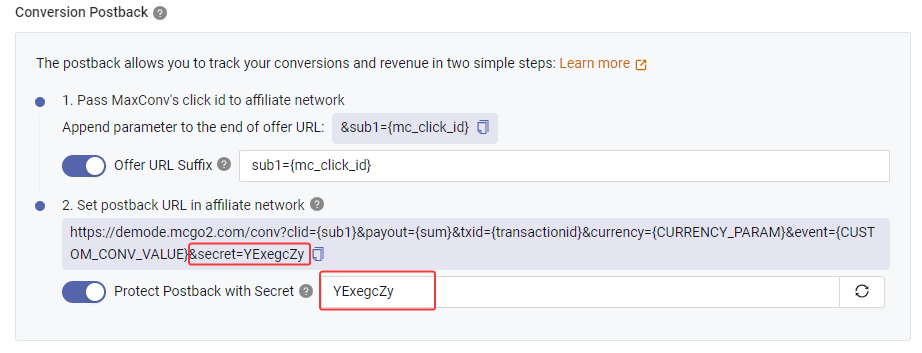
To prevent fake conversions from sophisticated bots or spies, you can protect your postback URL by enabling "Postback Secret".
Once enabled, you need to enter a few characters as a secret, or click the button to let the system generate a random secret for you.
Then add &secret=YOUR-SECRET to your postback URL. Postback requests with the wrong secret will be rejected. Do not share this secret with anyone once you save the affiliate network details.
The Postback Secret is set at the affiliate network level, which means if you set a secret for one affiliate network, it won't affect postbacks for other affiliate networks.